CLI Flags
Usage
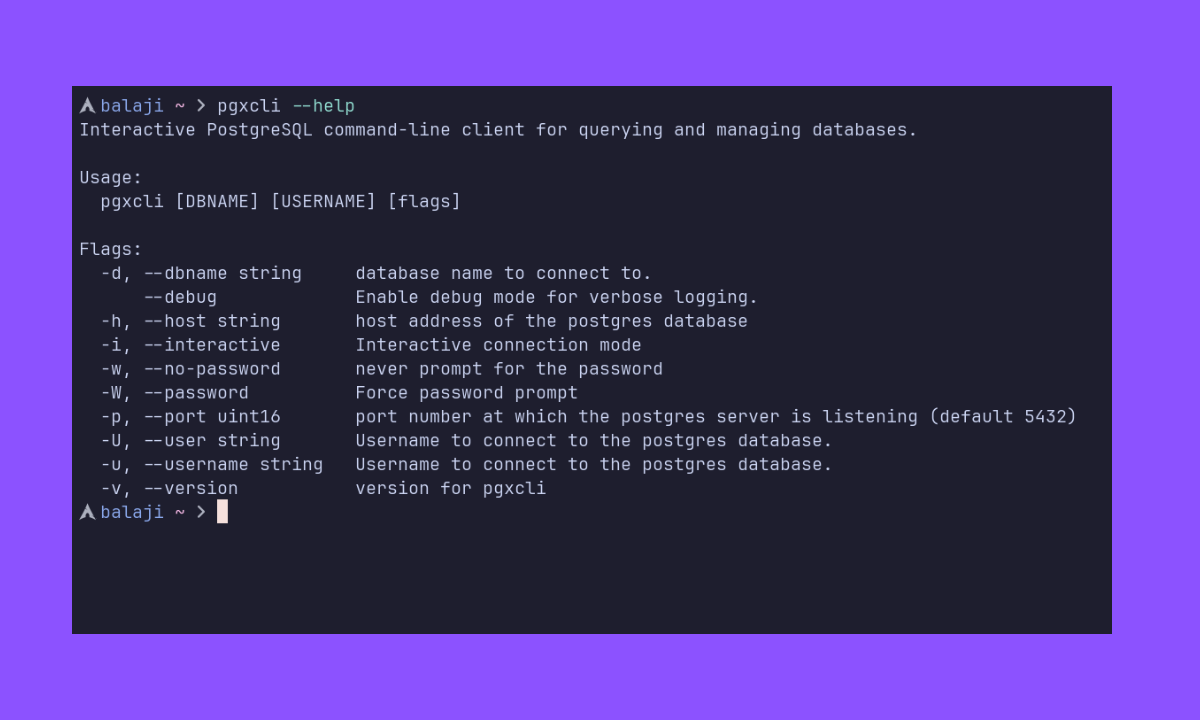
pgxcli [DBNAME] [USERNAME] [flags]
DBNAME and USERNAME are optional positional arguments. Everything below can also be set via environment variables or the config file.
Connection Flags
--host, -h
PostgreSQL server host address.
- Type:
string - Default: (empty — lets libpq resolve, typically
localhostor Unix socket)
--port, -p
Port the PostgreSQL server is listening on.
- Type:
integer - Default:
5432
--username, -u
Username to connect as.
- Type:
string - Default: (current OS user, or
PGXUSER/PGUSERenv var)
--user, -U
Alias for --username. Works the same way.
--dbname, -d
Database name to connect to.
- Type:
string - Default: (none)
--password, -W
Force a password prompt before connecting. Useful when you know the server requires a password and want to avoid a failed connection attempt first.
- Type:
boolean - Default:
false
--no-password, -w
Never prompt for a password. If the server requires one, pgxcli reads it from PGXPASSWORD or PGPASSWORD environment variables instead.
- Type:
boolean - Default:
false
--password and --no-password are mutually exclusive. You can't use both.
Mode Flags
--interactive, -i
Launch an interactive TUI form to enter connection details. Any flags or positional arguments you pass are used as default values in the form.
- Type:
boolean - Default:
false
Other Flags
--debug
Enable debug logging. Logs are written to the file specified by log_file in your config.
- Type:
boolean - Default:
false
--version
Print the pgxcli version and exit.
--help
Print usage information and exit.
--help has no -h shorthand — that's used by --host instead.
Examples
# Connect with positional arguments
pgxcli mydb myuser

# Connect with flags
pgxcli -h localhost -p 5432 -U postgres -d mydb

# Connection URI
pgxcli postgres://user:password@localhost:5432/mydb

# Interactive connection form
pgxcli -i

# Interactive form with defaults pre-filled
pgxcli -i -h myhost -d mydb

# Force password prompt
pgxcli -W mydb myuser

# Debug mode
pgxcli --debug mydb
